Building pages: be the agent on the development page buyers read
Publish your own commentary on one development's price page, exclusively, so the people researching that building meet you first.
What it is
Every private development on the site has a page built from URA transaction records: median price, range, floor-level pricing, rental data. A building page attaches your written local commentary to one of those developments.
While it is published, no other agent can present that development. It is first come, first served, and the slot is yours while the page is live.
It is clearly labelled as agent commentary next to the neutral data, with your name, agency, CEA registration and a booking link.
Why we built it
People research a building's prices long before they choose an agent. That is the moment where local knowledge is worth the most and where almost no agent is present.
Exclusivity is what makes it worth writing something good. A page with five agents shouting on it is a directory, not a recommendation.
It changes nothing about ranking. Presenting a development never moves your AgentScore, your search position or your lead flow, and the page says so out loud where consumers can read it.
Who it helps
Agents who genuinely farm a development
You meet the buyers and sellers researching it, at the moment they are researching.
Buyers and sellers reading the data
Local context next to the numbers, from someone named and registered, clearly marked as their commentary.
The use case
The condo you have sold in four times
You know one development better than anyone, down to which stacks face the afternoon sun. You claim its page, write four paragraphs of the things the price table cannot say, and publish. From then on, the owners and buyers reading that development's transaction history read your commentary underneath, with a button to book you.
Walkthrough
- 01
Open the Find tab
Look for the Building pages card. It shows how many pages your plan allows.
- 02
Find your development
Search by name. Results show the street, district and how many transactions we hold.
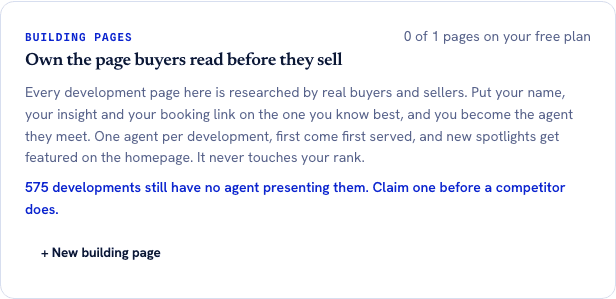
Every result carries the transaction count behind that development's page, so you can see how much data your commentary would sit beside before spending your one free slot. The 575 is computed live from developments with real transaction depth that no agent has claimed yet. - 03
Write it
A headline up to 90 characters and your commentary, at least 350 characters to publish.
- 04
Publish
It goes live immediately. If another agent already presents that development, you are told and can save a draft instead.
- 05
It appears with the data
Your spotlight renders on the development page with your name, agency, CEA number and a booking link, plus a note that it is agent commentary.
What it does not do
- Private residential developments only. No HDB blocks and no landed estates.
- One agent per development at a time. If someone already has it, you cannot.
- There is no edit flow yet. To change your text you delete the page and write it again, which also releases the development.
- A newly published spotlight can take until the next site build to appear on a development page that is already cached.
- There is no performance data on the page yet: no views, no clicks.
- Grow, at S$19 a month, buys you more developments to write on. It never buys a better position, a higher score or more leads, and a paying agent's commentary is presented exactly the same way a free agent's is.
- It never affects your ranking, your AgentScore or your leads. That is enforced in the code, not just promised here.
More of what we are building
AgentScore now counts only your own record
The agency Google rating used to be 15 of the 100 points. It is gone. Every point now comes from the agent's own CEA transaction record, and the four remaining dimensions were rescaled to total 100.
The dashboard now starts with what you already are, not a form
Setup is confirmation instead of composition, the worklist reads your real deals, a letter of intent is one tap away, and account admin has its own tab so the surfaces you work on stop asking you for money.
Your dashboard follows the deal now, not our toolbox
One property is one deal. The enquiry, the viewings and the paperwork for the same flat sit together, and the stage moves itself when you finalise a letter of intent or sign a tenancy agreement.