Your dashboard follows the deal now, not our toolbox
One property is one deal. The enquiry, the viewings and the paperwork for the same flat sit together, and the stage moves itself when you finalise a letter of intent or sign a tenancy agreement.
What it is
Four tabs, named after your work rather than our tools: Today, Pipeline, Find and You. Today is what needs you now. Pipeline is every deal you are working. Find is where the next one comes from. You is your profile, plan and standing.
Pipeline is the spine. Each row is one property, showing who is on the other side, what it is waiting on, and how long it has been sitting. Open it and the viewings and documents for that property are there together.
You are never asked to create a deal. Confirming a viewing, winning a seller enquiry, or typing an address into a letter of intent creates one for you. Starting one by hand exists for the deal that began on WhatsApp, and that is the only place you name one.
The stage keeps itself current. A confirmed viewing moves a deal to Viewing, a finalised letter of intent to Offer, a signed tenancy agreement to Agreement. You can override any stage by hand, and a later real event still moves it on.
Why we built it
The dashboard had one surface for each part of your job and no thread running through them. A viewing lived in one place with the address typed as free text, and the letter of intent you wrote after that viewing lived in another with the address buried in a different shape. Two records about the same flat on the same afternoon, and the software did not know they were related.
That is why it read as a drawer of tools. No arrangement of tabs fixes it, because the missing piece was not a tab. It was the deal.
Rentals are 58% of recorded CEA activity and roughly three rental contracts happen for every resale, so the sequence we tuned for is the one most agents actually run: viewing, letter of intent, tenancy agreement.
Who it helps
Rental salespeople
The pivot from a viewing to an offer is two taps on a phone, with the property already filled in. That moment is where the deal is won, and it is the one we made shortest.
Anyone taking seller enquiries
An enquiry and the deal it becomes are in one tab instead of two, so replying and working the property are the same place.
Agents juggling several properties
A row tells you what each deal is waiting on and how long it has been waiting, so the one going cold is visible without opening anything.
The use case
A Saturday viewing that turns into an offer
You confirm a viewing for Saturday and the deal appears on its own. On Saturday the tenant wants it. Standing in the flat you open Pipeline, tap the deal, and tap Issue a letter of intent. The property and the prospect are already in it, on your letterhead with your CEA registration. You fill in the term, the rent and the deposits and send it before you leave. When the landlord accepts, the deal is at Offer and the row tells you the next thing: create the tenancy agreement, which starts from that letter with the deal carried across.
Walkthrough
- 01
Open Pipeline
Your deals are grouped by the stage they are actually at: Enquiry, Viewing, Offer, Agreement. Closed ones collapse out of the way.
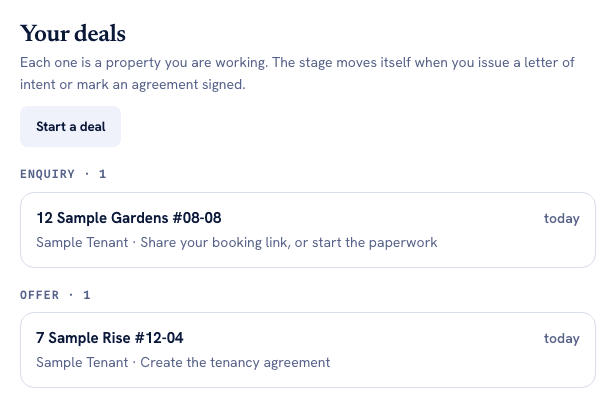
Stage groups in workflow order. The line under each property is its next action, so a row tells you what it is waiting on without opening it. - 02
Let a deal appear
Confirm a viewing, or start a letter of intent and type the address. Either creates the deal. You will rarely start one by hand.
- 03
Tap the deal
The viewings and documents for that property are inside it, with one primary action for whatever the stage needs next.
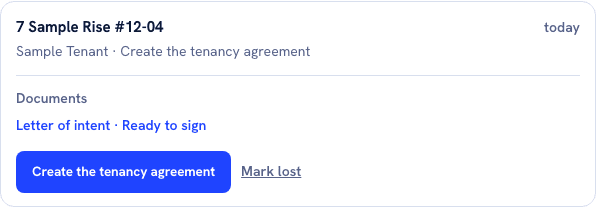
The deal at Offer stage. Its letter of intent is already signed off, so the primary button is the tenancy agreement that follows, not a menu of everything the tool can do. - 04
Work it
Issue the letter of intent, then create the tenancy agreement from it. The stage follows the documents, so there is nothing to keep updated.
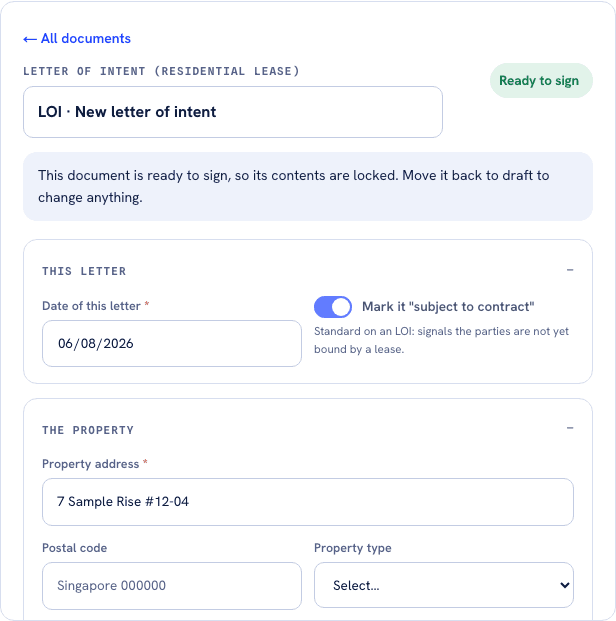
The property carried across from the deal, so the letter opens with the address already in it. Once you mark it ready to sign the fields lock, which is what moves the deal to Offer. - 05
Close it
Mark it completed when the lease starts, or lost with a reason. Closed deals stay in your history.
What it does not do
- It is not a CRM. There is no contact database, no email sync and no lead scoring, and we are not planning any.
- The stage only moves on evidence: a confirmed viewing, a finalised letter of intent, a signed tenancy agreement. Opening a blank form moves nothing, which is deliberate.
- Nothing books a viewing for you. Your booking link is the mechanism, and a request from it does not become a deal until you confirm it.
- Sale-side deals are tracked, but the paperwork chain is rental only. There is no Option to Purchase and there will not be one for HDB resale.
- There is no invoicing. In Singapore the commission invoice comes from the agency, not from you.
- A deal belongs to one agent. Nothing is shared across a team, and co-broke is not modelled.
- Deals are matched to a property by its address, so two genuinely different units need two different addresses typed.
Try it now
Open your pipelineMore of what we are building
AgentScore now counts only your own record
The agency Google rating used to be 15 of the 100 points. It is gone. Every point now comes from the agent's own CEA transaction record, and the four remaining dimensions were rescaled to total 100.
The dashboard now starts with what you already are, not a form
Setup is confirmation instead of composition, the worklist reads your real deals, a letter of intent is one tap away, and account admin has its own tab so the surfaces you work on stop asking you for money.
Paperwork: the letter of intent, and the tenancy agreement that fills itself
Draw up a rental letter of intent on your own letterhead in about two minutes, then start the tenancy agreement from it with the deal already carried across.