Paperwork: the letter of intent, and the tenancy agreement that fills itself
Draw up a rental letter of intent on your own letterhead in about two minutes, then start the tenancy agreement from it with the deal already carried across.
What it is
The documents live inside the deal they belong to, in your Pipeline. They cover the two that open and close a rental: the letter of intent, and the residential tenancy agreement.
Both come out on your letterhead, with your name and CEA registration already on them, because we hold your profile. You fill in the property, the parties and the commercial terms, and download a clean PDF.
The part that saves the most time is the chain. Once the landlord accepts, one tap starts the tenancy agreement from the letter of intent and carries the property, the parties, the term, the rent, the deposit and the clause choices across.
Why we built it
We looked at what agents actually do between a viewing and a signed lease, and it is paperwork. Singapore runs roughly three rental contracts for every resale, so the letter of intent is one of the most-typed documents in the industry, and there is no official template for it. Every agency retypes its own.
We read three real executed letters of intent from Singapore deals before writing a line of code. They taught us the thing the online guides miss: the letter is the salesperson's instrument, issued over their name and CEA registration, with the agency's own protections in it. That is why a generic template site cannot produce a usable one, and why we can.
The market conventions in those letters disagreed with each other. One converted the good-faith deposit into the security deposit, another into the first month's advance rental. So every convention here is an editable field with its market range shown, never fixed wording that puts words in your mouth.
Who it helps
Rental-heavy salespersons
The document you produce most often, from your phone in the lift after a viewing rather than in a Word file back at the office.
Anyone running a deal end to end
The deal is typed once. The tenancy agreement inherits it, so the two documents cannot quietly disagree about the rent, the term or who pays the stamp duty.
Landlords and tenants on the other side
A complete, consistent letter with the deposit mechanics spelled out, rather than a template with clauses that contradict each other.
The use case
A viewing that just turned into a deal
You have shown a condo unit on a Saturday afternoon and the tenant says yes. The landlord wants something in writing today. Instead of finding last month's file and editing over it, you open the deal in your Pipeline, tap to issue a letter of intent, and the letter is already on your letterhead with your CEA registration and the standard clauses in place. You type the parties, the rent, the term and the deposits, download the PDF and send it. When the landlord accepts, the tenancy agreement starts from that letter.
Walkthrough
- 01
Open Pipeline
In your dashboard, the Pipeline tab. Every deal opens with the paperwork it needs, and a confirmed viewing carries the property across.
- 02
Choose the document
Pick Letter of Intent or Tenancy agreement. Each card says roughly how long it takes.
- 03
Check your letterhead
Your name, CEA registration and agency are already filled in from your profile and collapsed out of the way. They are fixed to you and cannot be edited into someone else's name.
- 04
Fill in the deal
Property, landlord, tenant and occupiers, term, rent, deposits, and the standard terms. Conventions such as the security deposit months, the minor repair cap and the diplomatic clause come with the market range as a hint, and every one of them is editable.
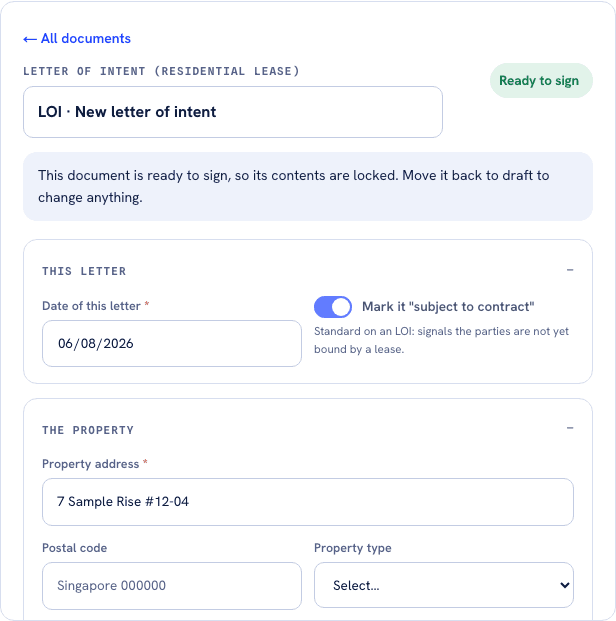
The property arrives already filled from the deal, so the letter opens part-written. Marking it ready to sign locks the fields, and that lock is the event that moves the deal to Offer. - 05
Preview the PDF
While it is a draft the PDF carries a DRAFT watermark, so an unsigned letter can never be mistaken for an executed one.
- 06
Mark it ready to sign
The watermark drops. We check the required fields first: a letter with no rent or no parties cannot leave draft.
- 07
Track what happened
Mark it sent out, then signed, as the deal moves. A signed document locks: it cannot be edited or deleted, and voiding it is the only way to correct a mistake, which keeps the record of the deal intact.
- 08
Start the tenancy agreement
From the signed letter, one tap starts the tenancy agreement with the deal already in it. Check the details, add the inventory, and you are done.
What it does not do
- It is a standard template for your review, not legal advice, and it says so on every page.
- It does not e-sign. You download the PDF and sign it the way you do today. Signing inside the tool is what we are building next.
- The inventory of furniture and fittings, and the two parties' contact details, do not carry across from the letter of intent, because a letter of intent does not carry them.
- It does not compute stamp duty. Lease duty is a joint liability of both parties and is stamped with IRAS; the document records who bears it. Our stamp duty calculator covers buying and selling duty, not lease duty.
- It will never produce an HDB resale Option to Purchase. That is a serialised form issued only through the HDB Resale Portal, and generating a lookalike would be a real problem for you.
- The good-faith deposit is paid to the landlord. We never hold money, and CEA does not permit a salesperson to hold transaction money either.
- Ten documents per rolling thirty days, the same for every agent. Voiding or deleting one frees the slot.
- The PDF footer carries one line saying it was prepared with FairComparisons.
Free, with a claimed profile.
See it on your letterheadMore of what we are building
AgentScore now counts only your own record
The agency Google rating used to be 15 of the 100 points. It is gone. Every point now comes from the agent's own CEA transaction record, and the four remaining dimensions were rescaled to total 100.
The dashboard now starts with what you already are, not a form
Setup is confirmation instead of composition, the worklist reads your real deals, a letter of intent is one tap away, and account admin has its own tab so the surfaces you work on stop asking you for money.
Your dashboard follows the deal now, not our toolbox
One property is one deal. The enquiry, the viewings and the paperwork for the same flat sit together, and the stage moves itself when you finalise a letter of intent or sign a tenancy agreement.