Deal Radar: the blocks in your farm areas coming up on MOP
Pick up to five towns or districts you work, and see which blocks have flats coming up on their five-year MOP, and what has sold there recently, from official records.
What it is
A prospecting list built from the same government transaction records the rest of the site runs on. You name up to five HDB towns or private districts you farm, and Deal Radar returns two lists.
First, blocks where flats changed hands about five years ago, so those owners are approaching the end of their Minimum Occupation Period. Second, the most recent sales recorded in those areas in the last 180 days.
Each row is one real recorded transaction. An HDB row is a block and street with the flat type, storey range, month and price; a private row is the development, property type, floor range, size, month and price. Any row can be turned into a co-branded seller report you can send.
Why we built it
Agents build MOP door-knock lists by hand, from memory or from a spreadsheet someone shared two years ago. The data to do it properly is public, it is just tedious to assemble.
We already hold the HDB resale and URA private transaction records for the whole island because the agent rankings run on them. Turning that into a farm list for a claimed agent costs us almost nothing and saves an afternoon.
It is free on every plan, deliberately. Prospecting is how an agent gets their first win here, and putting a paywall in front of that would be a strange way to earn someone's trust.
Who it helps
HDB resale agents with a farm area
The list you would have built by hand, ready when you open the tab, refreshed against the official record.
Agents moving into a new area
A read on what is actually trading there in the last six months before you commit your time to it.
The use case
Planning a Saturday of door-knocking
You farm two HDB towns. On Friday evening you open Deal Radar and see the blocks where flats changed hands around five years ago, so those households are coming up on their MOP, alongside every sale recorded nearby in the last six months. You plan the route around the blocks with both signals, and you knock with the recent prices already in your head.
Walkthrough
- 01
Open the Find tab
Deal Radar sits at the top of the Find tab in your dashboard.
- 02
Add your farm areas
Choose HDB town or District, pick the area, press Add. Up to five, the same on every plan.
- 03
Read the MOP list
Block and street, flat type, storey range, and the note telling you which month the flat was bought and that it is approaching the five-year MOP.
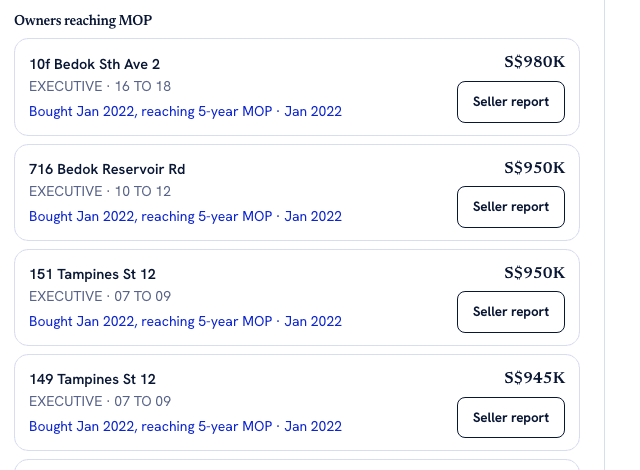
Every row is a real recorded HDB transaction, not a prediction. The signal is simply arithmetic on the purchase date: these owners reach their five-year minimum occupation period soon, which is when a resale becomes possible. - 04
Read recent sales
The most recent sales in those areas over the last 180 days, HDB and private, with price and month.
- 05
Turn a row into a conversation
Press Seller report on any row to open a co-branded report of recent comparable sales, with your photo, name and record on it, ready to send.
What it does not do
- These are households approaching their MOP, not owners past it, and not a complete list. We can only see flats that appear as a resale transaction about five years ago, so a household that bought their flat new from HDB never shows up.
- There are no names, no unit numbers and no contact details. A row is a block, a street and a recorded transaction. Everything on it is already public.
- It does not predict who will sell. There is no score and no likelihood model, only two signals.
- It covers HDB resale and private transactions. No landed-only view, no rentals, no listings.
- HDB records refresh weekly. Private district records depend on a manual load, so their recency is not guaranteed the same way.
- Five areas is the cap on every plan, including the paid ones.
- The feed shows the most recent rows in each list, not the full 180 days. In a busy town more has sold than we show.
Try it now
See how Deal Radar worksMore of what we are building
AgentScore now counts only your own record
The agency Google rating used to be 15 of the 100 points. It is gone. Every point now comes from the agent's own CEA transaction record, and the four remaining dimensions were rescaled to total 100.
The dashboard now starts with what you already are, not a form
Setup is confirmation instead of composition, the worklist reads your real deals, a letter of intent is one tap away, and account admin has its own tab so the surfaces you work on stop asking you for money.
Your dashboard follows the deal now, not our toolbox
One property is one deal. The enquiry, the viewings and the paperwork for the same flat sit together, and the stage moves itself when you finalise a letter of intent or sign a tenancy agreement.