Pitch Kit: walk into the listing appointment with your record
A live web page proving what you have actually closed in one area, built from official records, that you can send a seller before the appointment.
What it is
Pick an area you work and Pitch Kit gives you a link. The page carries your photo, agency, CEA registration and AgentScore, then the deals you have closed in that area, your career totals, your recent deals there and what has sold in that area lately.
It rebuilds from the record every time it is opened, so it is never a stale saved file, and there is nothing to design or maintain.
It also shows your own context flags. If most of your work is rentals, or you are mostly buyer-side, the page says so.
Why we built it
Every agent arrives at a listing appointment claiming to be the area expert, and the seller has no way to tell who is right. A link to an independently compiled record settles it in a way a personal brochure cannot.
The alternative an agent reaches for is a personal brochure of past listings, which the seller has already seen three of that week and discounts accordingly. A page the agent cannot edit does the job the brochure was failing at.
Who it helps
Agents with a real record in an area
Independent proof, sent before you arrive, instead of claims made once you are in the room.
Sellers deciding between agents
The same figures for each agent, compiled the same way, rather than three different self-reported brochures.
The use case
Two days before the listing appointment
A seller in a town you work has agreed to meet you on Thursday. On Tuesday you send them your Pitch Kit link for that town. They open it and see how many deals you have actually closed there, when the most recent one was, how you rank among agents active in that area, and what has sold nearby. By Thursday the conversation has moved past whether you know the area.
Walkthrough
- 01
Open the Find tab
The Pitch Kit card sits under Deal Radar.
- 02
Pick an area
The chips come from your own record, labelled with how many deals you have done there.
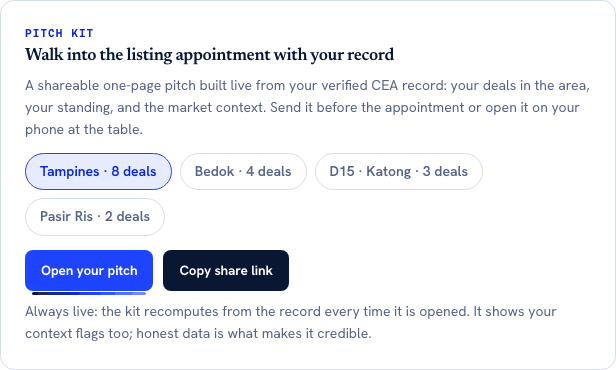
The areas and their counts are read from the agent's own CEA record, so there is nothing to assemble and nothing to keep up to date. The line about context flags is the point: the pitch carries the unflattering parts of a record as well as the flattering ones, which is what makes a seller believe the rest of it. - 03
Open or copy
Open your pitch shows you the page. Copy share link puts the URL on your clipboard.
- 04
Send it
WhatsApp, email, wherever you already talk to the seller.
- 05
It stays current
The page recomputes on every open, so a deal you close next week is on it without you touching anything.
What it does not do
- The link is not private. It is hidden from search engines, but anyone who has the URL can open it, so treat it as a page you send rather than a secret.
- It is not a valuation or a CMA. The market section is area-level recent transactions with a median across them, clearly labelled as such.
- You cannot edit it, brand it or add your own marketing plan. Every figure is computed, which is what makes it worth sending.
- It is a web page, not a PDF or a deck.
- It does not tell you when the seller opened it.
More of what we are building
AgentScore now counts only your own record
The agency Google rating used to be 15 of the 100 points. It is gone. Every point now comes from the agent's own CEA transaction record, and the four remaining dimensions were rescaled to total 100.
The dashboard now starts with what you already are, not a form
Setup is confirmation instead of composition, the worklist reads your real deals, a letter of intent is one tap away, and account admin has its own tab so the surfaces you work on stop asking you for money.
Your dashboard follows the deal now, not our toolbox
One property is one deal. The enquiry, the viewings and the paperwork for the same flat sit together, and the stage moves itself when you finalise a letter of intent or sign a tenancy agreement.