Planner: one booking link, and viewings you can actually track
A public booking link you can share anywhere, turning viewing requests into a list you confirm, complete or cancel. Confirmed viewings write into your own Google or Outlook calendar, and viewings you arranged elsewhere can be added by hand so the planner holds all of them.
What it is
Every claimed agent gets a booking page at a link they can share in listings, bios and messages. A buyer opens it, picks a property, a date and a time, leaves a name and one contact, and sends the request without creating an account.
The request is emailed to you and appears in your dashboard, where you confirm it, mark it done or cancel it.
Connect Google Calendar or Outlook and a confirmed viewing is written into it automatically, moved when you reschedule and removed when you cancel. Your existing appointments are read back as busy time, so your booking link stops offering slots you are not free for.
A viewing you arranged in WhatsApp can be added by hand, so the planner holds everything rather than only what came through the link.
A viewing that did not happen can be marked as a no-show, which keeps the record honest instead of leaving it looking completed.
Why we built it
Arranging viewings is a WhatsApp back-and-forth that costs both sides a dozen messages to land a time. A link removes most of that.
It also gives the agent one place where requests live, rather than scattered across chats, which is what turns a viewing into a letter of intent without anything falling through.
Who it helps
Agents juggling several viewings a week
One link to share and one list to work from, instead of scrolling chats to remember who asked for Saturday.
Buyers and tenants
Ask for a time in a few taps, with no account and no phone call, and it reaches the agent in one place.
The use case
A listing that draws ten enquiries in a day
You put your booking link in the listing and in your bio. Ten people ask to view. Instead of ten separate threads, ten requests land in your Pipeline with the property, the time and the contact. You confirm the ones that work and cancel the ones that clash, then message those ten people yourself, because we do not write to them for you. When one of the viewings turns into a deal you issue the letter of intent straight from that row.
Walkthrough
- 01
Copy your link
In the Pipeline tab, the Viewings panel shows your booking link with a copy button.
- 02
Share it
Listings, bio, messages. The page shows your photo, agency, CEA number and AgentScore.
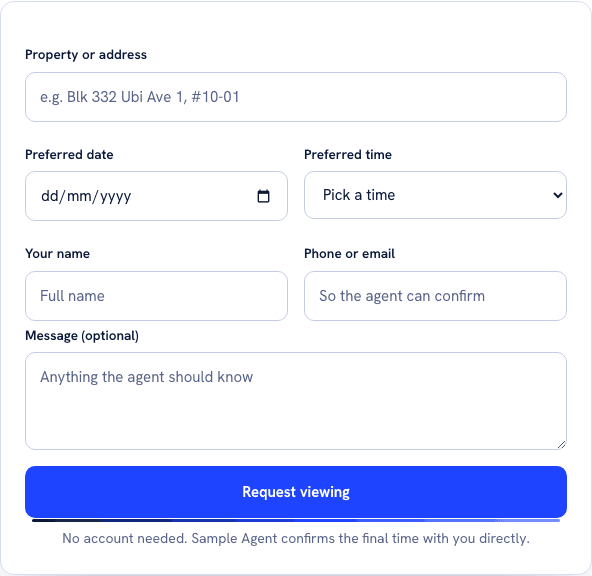
Six fields, no password, no account step. This is the entirety of what the person who opens your link has to do, which is what replaces the dozen-message thread the entry describes. - 03
Requests arrive
You get an email and the request appears in your Pipeline marked as a new request.
- 04
Confirm or cancel
Confirm, mark done, or cancel. If a calendar is connected, a confirmed viewing is written to it.
- 05
Turn it into a deal
On a confirmed viewing, Issue a letter of intent jumps to Paperwork with the property already filled in.
What it does not do
- We do not notify the buyer after their request. Confirming or cancelling updates your list and your calendar, and contacting them is still your job. Closing that gap is on our list.
- The time slots are a fixed nine to seven, the same for every agent. It does not read your calendar for conflicts before offering a time.
- Calendar connection needs to be switched on for your account and no agent has connected one yet, so treat it as new rather than proven.
- There are no reminders, no rescheduling and no recurring availability. Confirm, complete, cancel.
- The booking page is only reachable through the link you share. It is not indexed and it is not linked from your public profile.
- The booking link itself is free and stays free. Ten viewings booked through it are free each month, and Planner, at S$39 a month, removes that meter.
More of what we are building
AgentScore now counts only your own record
The agency Google rating used to be 15 of the 100 points. It is gone. Every point now comes from the agent's own CEA transaction record, and the four remaining dimensions were rescaled to total 100.
The dashboard now starts with what you already are, not a form
Setup is confirmation instead of composition, the worklist reads your real deals, a letter of intent is one tap away, and account admin has its own tab so the surfaces you work on stop asking you for money.
Your dashboard follows the deal now, not our toolbox
One property is one deal. The enquiry, the viewings and the paperwork for the same flat sit together, and the stage moves itself when you finalise a letter of intent or sign a tenancy agreement.